


 3:41 PM
 Unknown
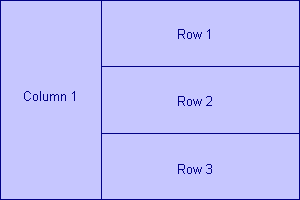
How would you design a table that looks similar to one below?
Okay, here goes...
There are two ways to look at this. We can consider the table to consist of two columns with the second column divided into three rows OR, the other way is to understand that the first column spans three rows. HTML uses the second line of thought for laying out the table.
<TABLE BORDER="1" CELLPADDING="0" CELLSPACING="0"
WIDTH="300" HEIGHT="200">

<TR>
<TD ALIGN="CENTER" ROWSPAN="3" WIDTH="100">Column 1</TD>
<TD ALIGN="CENTER" WIDTH="200">Row 1</TD>
</TR>

<TR>
<TD ALIGN="CENTER">Row 2</TD>
</TR>

<TR>
<TD ALIGN="CENTER">Row 3</TD>
</TR>

</TABLE>
| Column 1 | Row 1 |
| Row 2 | |
| Row 3 |
The first cell of the first row has ROWSPAN attribute set to 3. The ROWSPAN attribute forces this cell to span 3 rows. Get it?
Now lets look at COLSPAN
<TABLE BORDER="1" CELLPADDING="0" CELLSPACING="0"
WIDTH="300" HEIGHT="70">

<TR>
<TD ALIGN="CENTER" COLSPAN="3"><B>Satisfying hunger?
</B></TD>
</TR>

<TR>
<TD ALIGN="CENTER" WIDTH="100" BGCOLOR="#DDFFDD"><IMG
SRC="apple1.gif" WIDTH="32" HEIGHT="32" ALT="..."></TD>
<TD ALIGN="CENTER" WIDTH="100" BGCOLOR="#AAFFAA"><IMG
SRC="apple2.gif" WIDTH="32" HEIGHT="32" ALT="..."></TD>
<TD ALIGN="CENTER" WIDTH="100" BGCOLOR="#00C000"><IMG
SRC="apple3.gif" WIDTH="32" HEIGHT="32" ALT="..."></TD>
</TR>

</TABLE>
| Satisfying hunger? | ||
 |  |  |
Actually the second row HAS to consist of three cells for the first row to span them correctly. Browsers generally will not display tables properly if there is difference between the number of columns specified in COLSPAN and the actual number of columns made via <TD> tag.

Now play with the code:
To check the result, click on the "Display" button. Another browser window pops up with the results. Modify the code in the box and check the results again. Get a good feel of this before proceeding to the next section.


0 comments:
Post a Comment